Openstack Cluster APU (apu.cloudlab.zhaw.ch)
Note
Due to the high demand for the cluster, the default resource quotas have been reduced. Below are the standard values now in place.
APU is situated within the ZHAW extranet (internet), meaning that servers deployed on APU are exposed to the internet and are not shielded by any firewall.
Access / Login
APU is not connected to the ZHAW Active Directory. We use local accounts.
To get access, please send an email to services.init@zhaw.ch. Your account information and additional details will be provided as quickly as possible.
Link to the dashboard: https://apu.cloudlab.zhaw.ch (access only from the campus network or via VPN)
Projects
Every user is assigned to one or more projects.
These projects are typically for
- classes (lecturing, labs, project track)
- research or industry projects
- PA/BA/MA works
- individual learning and testing
To create or get access to a project, send an email to services.init@zhaw.ch.
Some Facts
- There is no access to the ZHAW Active Directory
- Servers are not protected by any firewall
Networking
General Information
The following standard networks are available: internal, internal2. These networks are available to all users.
In order to reach the server (instance) via SSH, a “Floating IP” must be assigned. The assignment is important here:
- internal -> external ( 10.0.0.0/24 -> 160.85.252.0/24 )
- internal2 -> external2 ( 10.10.0.0/24 -> 160.85.253.0/24 )
Certainly, you have the option to create your own networks and routers. For more information on how to do this, please refer to the official OpenStack documentation.
Firewall / Security Groups
Note
Servers are not pingable or accessible by default. To enable connectivity, you need to add additional security groups to your project
Openstack provides a firewall, which can be configured on every project individually.
The configuration of the firewall is done by adding / modifying Security Groups (on GUI go to: Project -> Network -> Security Groups).
Each new project comes with a default security group that permits outbound traffic (to the internet) from all operational servers. It is recommended not to modify this rule.
One possible approach is to create one security group per service (eg. SSH, HTTP, HTTPS). Then, you can attach the security group to the server that requires exposure on the respective port.
Depending on your requirements, you can assign one or multiple security groups to each server.
For more complex setups, another approach is to create and attach a dedicated security group for each host. The best method depends on your specific requirements.
The optimal approach should be selected based on individual preferences and requirements.
Note
We suggest to keep server access as limited as possible
For testworkloads it is recommended to limit the server access to the ZHAW network. Once your deployment is safe, you are free to expose it to the internet.
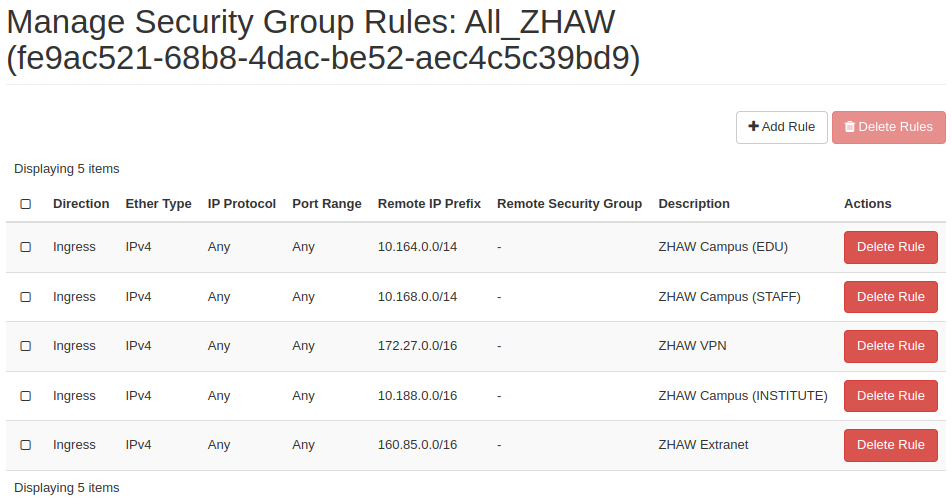
Below you find an example security group rule, which allows all traffic from all ZHAW clients (click image to enlarge):
Storage
Since May 2024, the central lab storage has consisted exclusively of fast SSD storage. This brings a huge performance gain, at the expense of the size of the storage. At the moment, we're able to offer storage for standard Workloads. Multi Terabyte volumes can not be offered at the moment.
Note
Please try to keep your storage footprint as small as possible.
Quota
Like any shared infrastructure, we've had to impose limits on the resources that each user can consume. For justified exceptions, the quota can be increased. If you need more resources for your project, send a mail to the lab admins: services@zhaw.ch.
Standard Quota
Here are the default resources allocated to each user when they begin working on APU:
| Value | |
|---|---|
| Instance Limit | 4 |
| vCPU cores | 8 |
| RAM | 16GB |
| Storage | 650GB |
| Networks | 10 |
| Subnets | 10 |
| Floating IPs | 1 |
| Routers | 10 |
| Snapshots | 10 |